

Quick summary
Automating accounts payable means centralising invoice capture, using AI invoice processing to extract data, applying automated three- or four-way matching and routing approvals through rule-based workflows. iplicit simplifies AP further for mid-sized UK businesses with native multi-entity support, finance-led configurations and AI-powered invoice processing as standard features.
What is the true cost of manual AP?
There is a real cost to doing AP the hard way. Finance teams at mid-market organisations often lose at least one full day every week just typing data from invoices. This happens because staff are constantly shuffling between email attachments and spreadsheets rather than focusing on high-impact analysis. Small errors made during manual data entry can lead to incorrect payments or prolonged troubleshooting sessions during your month-end close.
Eventually, businesses reach a point where the number of transactions is simply too high for them to handle manually. The solution is automating your accounts payable process.
This iplicit guide explains how accounts payable automation works and how you can implement it.
Our experience
At iplicit, we work with leading UK mid-market finance teams to automate their accounts payable processes. From recruitment firms to hospitality groups, we have seen where manual AP breaks down and what it takes to fix it. This article draws on that direct experience across hundreds of implementations, not just generic industry knowledge.
What is accounts payable automation?
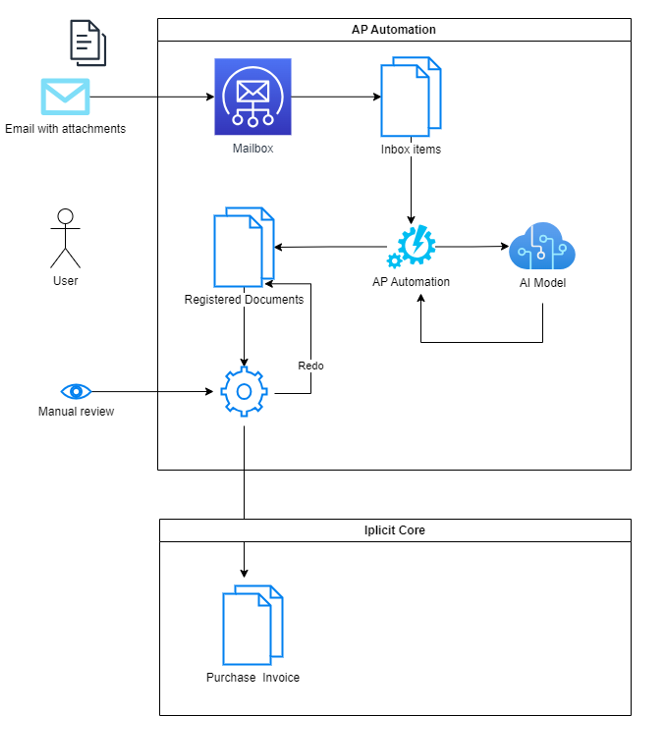
Accounts payable automation refers to the technology that handles your invoice and payment workflows without needing constant manual intervention. Instead of finance assistants manually typing data from paper or PDFs into the system, software takes over the heavy work of capturing and matching documents.
The scope covers the entire journey of a bill. It starts the moment a vendor sends it to your inbox and continues until the final payment appears in your bank reconciliation. For many mid-sized organisations, the process involves several layers, such as:
- Optical character recognition (OCR) to read the data
- logic-based approval routes for department heads
- automated verification against purchase orders.
With AI and machine learning (ML), the software identifies patterns in how you code expenses or who usually signs off on certain amounts. Most platforms can automatically assign ledger codes as soon as data is captured. This simplifies how you track and categorise every transaction.
Why does AP automation matter?
Beyond just moving data, accounts payable automation provides a central hub where your procurement and accounting teams can see the status of any transaction in real time. It also brings together two important shifts:
- The move from cheques and manual bank transfers to digital payment methods.
- Automated matching, where the software checks your financial records against each other to catch errors before they reach your bank.
Together, these keep your books accurate and your audit trail clean.
Why mid-sized organisations reach the tipping point for automation
Finance teams at mid-sized businesses often feel the strain long before they change their systems. Eventually, the volume of work becomes too great for the existing team to manage without adding more staff. That’s when they start considering automation. Here are some of the key tipping points.
1. Entry-level accounting software starts holding the business back
Tools such as Xero or Sage 50 are good for smaller businesses. They are easy to set up and very reliable for basic bookkeeping.
However, these platforms lack the depth needed for a business with 50 to 500 staff, for example. In such instances, the systems begin to feel stretched because they can’t manage the level of detail your board now requires. Once-trusted software starts to act as a brake on your progress.
2. Managing multiple entities manually becomes unworkable
Managing several sites or subsidiaries is also a major challenge for traditional systems. Most entry-level tools require you to maintain separate files for each company. In a setup like that, consolidation has to be done manually.
This leads to days wasted every month trying to get a group-level view of your cash position. If you are also having to record inter-company transactions twice, the risk of errors increases significantly. At that point, your current setup cannot grow with your multi-entity structure.
3. You spend excessive time on manual data entry
Recent studies show that finance teams spend over 10 hours a week on manual invoice tasks that could instead be spent on forecasting or analysis. Relying on a small team to key in hundreds of invoices invites mistakes. Even a single wrong digit can lead to an incorrect payment or a messy reconciliation:
- Manual month-end processes often take up to three weeks to complete.
- Actionable insights are difficult to find when data is stuck in spreadsheets.
- High transaction volumes can cause the performance of older systems to drop off.
When the finance function is taken up with time-intensive manual work, it cannot support the wider strategic goals of the business.
4. Your system isn’t up to modern compliance standards
Regulations like Making Tax Digital (MTD) mean businesses must keep digital links between their records. Organisations in the charity or education sectors also have to follow specific reporting standards like SORP or SOFA.
A manual system makes it harder to provide the clear audit trails that regulators expect. If you cannot easily show who authorised a payment or why a certain ledger code was used, your audit will be more difficult than necessary. Automation provides a secure way to ensure your records are always audit-ready.
How AP automation works (step-by-step)
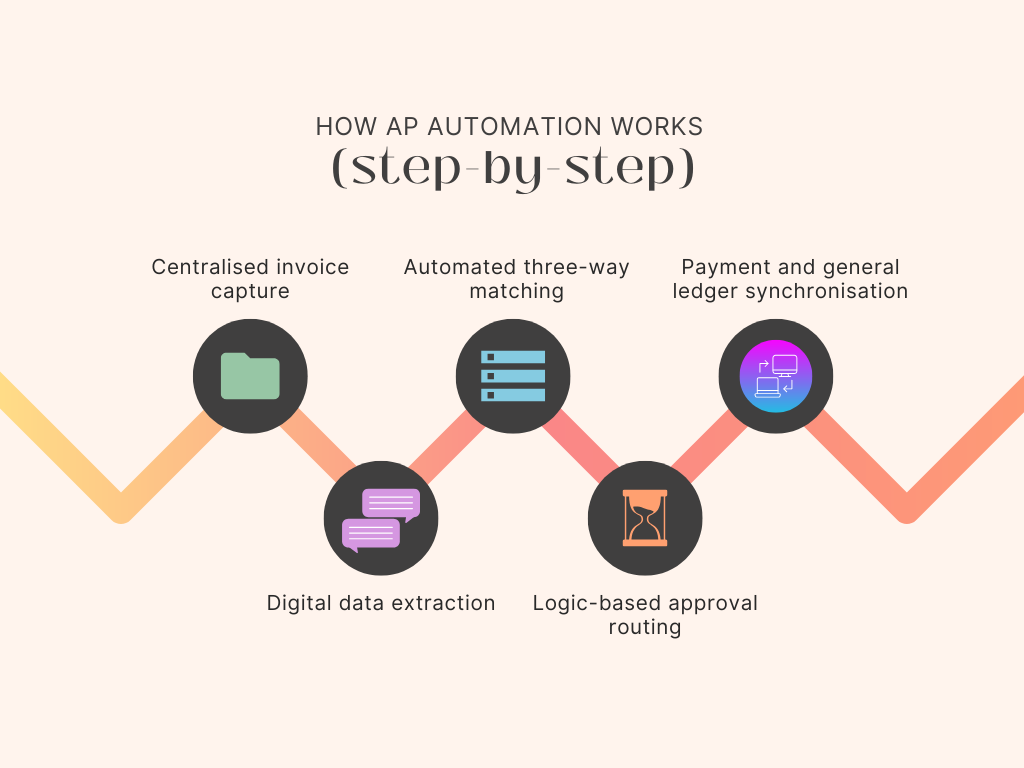
Here’s how an automated AP workflow runs, from start to finish.
Step 1: Centralised invoice capture
Gathering documents is the first hurdle in any finance department. Instead of leaving the team to process a mix of physical post, scattered email attachments and various vendor portals, the software creates a single entry point for every bill.
Most modern platforms provide a dedicated email address where suppliers can send their invoices directly. If you still receive paper documents, you can scan or take a picture of them to bring them into the digital queue.
Once a file enters this central space, it is automatically assigned a reference ID and logged into the system.
Step 2: Digital data extraction
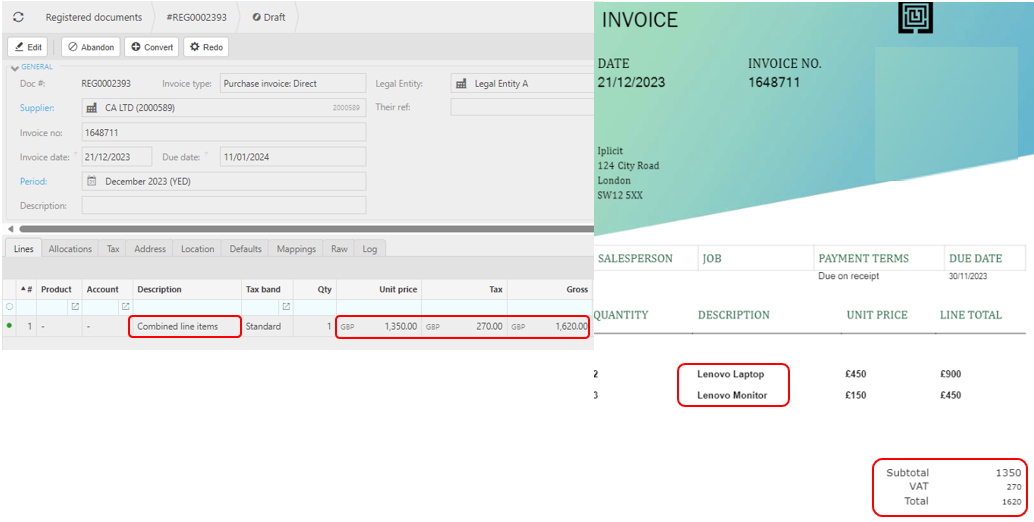
After a document is captured, the software needs to understand what the document contains. It uses optical character recognition (OCR) to read the text on the page and identify key fields.
For example, the system identifies the following without anyone having to type a single word:
- Vendor name
- The total amount
- Any tax figures
- The due date.
More advanced tools use ML to recognise patterns in how your specific suppliers format their bills, which makes the extraction more accurate over time.
Step 3: Automated three-way matching
Once the data is extracted, the software performs a verification check known as three- or four-way matching. It compares the invoice against the original purchase order and the receiving report. This is done to help ensure you are only paying for what you ordered and received.
If the numbers align across all three documents, the invoice gets cleared for the next stage. However, if there’s a discrepancy, such as a different price, a missing item or a lower delivered quantity than you were billed for, the software flags the transaction for a human to review.
Step 4: Logic-based approval routing
Invoices that pass the matching phase are then sent to the correct department heads based on your defined rules. For instance, you could set thresholds that send anything over £5,000 to a director, while smaller amounts stay within the department.
Approvers of these invoices get an alert on their computer or mobile device that they can then sign off on in just a few clicks. The system also takes care of chasing unpaid invoices by sending automatic reminders if a bill is in someone’s inbox for too long.
Step 5: Payment and general ledger synchronisation
In the final stage, the approved invoice is scheduled for payment and recorded in your records. Because the automation platform integrates with your existing accounting software, the general ledger is updated automatically.
You can choose to pay the bill immediately or schedule it to match your cash flow policies. The system then reconciles the transaction against your bank statement to ensure everything matches up. By the time you reach month-end, the work of matching and verifying is already done, and you can close the books faster.
Key features to look out for
Before browsing your options, you need to know what makes the right AP automation platform for your business. Here are some key features you might want to look for:
1. Native multi-entity consolidation
With traditional and entry-level accounting packages, every company in your group is a silo. If there are three entities in the group, you end up with three different logins and three sets of data. Managing a group structure in this way only results in manual work, errors and wasted hours.
Native multi-entity support allows you to oversee the whole group from a single login. Meaning:
- Inter-company transactions appear in both ledgers without someone having to enter them twice
- Consolidated reporting happens in real-time without you needing to export files to a spreadsheet for manipulation
- Shared charts of accounts keep everything consistent across the whole group.
Having everything in one centralised place saves valuable time on manual reconciliations every month. It ensures that your group-level cash position is always visible without waiting for every individual site to close its books. iplicit handles this natively, without requiring separate logins or manual exports.
2. Dimensional analysis for detailed reporting
A flat chart of accounts usually forces finance teams to create hundreds of general ledger (GL) codes to track where money is going. If you want to know how much a specific department spent on a particular project at a certain location, your list of codes becomes unmanageable very quickly.
AP software like iplicit solves this using dimension tags that categorise and analyse transactions beyond the basic GL account code. For example, you can have a single GL code for consulting services, and then add dimension tags for the department, project, or employee.
Using this approach keeps your ledger organised and allows for very detailed reporting without any extra effort during data entry. You can filter your data by any combination of these tags to get the specific answers you are looking for.
3. Granular role-based permissions
Fraud and error are a major concern for growing UK finance leaders. The ideal AP automation software should allow you to define what each member of the team can see and do within the system.
For example, a junior assistant might be able to scan invoices, but you wouldn’t want them to see the full profit and loss report for the entire group. Or a department head might have access to their own budget but no one else's. iplicit allows you to set these user roles and permissions for staff members.
How iplicit supports AP automation
iplicit is a UK-built cloud finance platform designed specifically to remove silos that slow down the AP process for growing businesses. Many mid-market systems make you buy extra modules or connect third-party apps to get basic invoice reading, but iplicit includes these features as standard. Pricing is transparent, with no hidden module costs and no long-term contracts to lock you in.
Transitioning to a new finance system can also be a significant project, with the potential to disrupt day-to-day operations. However, iplicit can complete implementations in weeks rather than months, while allowing organisations to migrate seven or more years of historical data into the new system.
Here’s what that allows you to do:
- Close your month-end faster because invoice data flows in automatically instead of waiting on manual keying from your AP team
- Catch pricing discrepancies before they turn into incorrect payments – thanks to four-way matching across purchase orders, requisitions, goods received notes, and invoices
- Empower your budget holders with mobile approvals, so authorisations don’t stall when someone is out of the office
- Keep group-level visibility of AP spend across every entity you run, from a single login, without exporting anything to a spreadsheet
- Configure approval rules, thresholds, and workflows yourself as your business changes, without the need for IT support or consultancy
- Keep your existing bank, payroll and expense tools in place and connect them with iplicit through an open API.
These benefits can transform the role of the finance team, allowing your people to focus on higher-value, strategic work rather than data processing, while keeping pace with growth.
Future-proof your finance function
By taking up so much of your team’s time every week, manual AP limits what finance can contribute to the wider business. Automation shifts your team’s focus from processing invoices to reviewing them. Month-end closes much faster.
iplicit handles multi-entity accounting natively, lets your team configure workflows without IT and doesn’t bury features behind paid modules.